Requests, tasks and projects.
One clear board.
Formatic gives your team Kanban boards, table views and shareable forms in one workspace. Collect an enquiry, give it an owner and see it through to done.
- Kanban boards and tables
- Forms to share or embed
- Owners, dates and permissions
One workspace.
Three ways to see it.
Plan on a board, check the detail in a table, or send the sample form and watch it become a card.
Website launch
7 cards · 3 peopleSwipe to see every list →
Map the customer journey
Draft the welcome email
Gather visual references
Build the landing page
Review customer feedback
Agree the project brief
Bring everyone on board
| Task | Status | Owner | Due | Priority |
|---|---|---|---|---|
| Map the customer journey | To do | JD | 12 Oct | Medium |
| Build the landing page | In progress | AK | 10 Oct | High |
| Review customer feedback | In progress | JD | 11 Oct | High |
| Draft the welcome email | To do | AK | 14 Oct | Medium |
| Gather visual references | To do | LS | 15 Oct | Medium |
| ✓Agree the project brief | Done | LS | Complete | Low |
| ✓Bring everyone on board | Done | JD | Complete | Low |
Let’s make something good.
Tell us a little about your project.
Your next project
Complete the example form to see an enquiry appear here.
From a form to a clear next step.
Useful on their own.
Better together.
Start with what you need today. Connect the pieces as your work grows.
See all features →Boards & tables
Plan projects with Kanban lists, then switch to a table when you need the detail. Keep owners, dates and custom fields with the work.
Explore boards & tables →CollectConnected forms
Turn your board into a form, share it with a link or embed it on your website. Keep the responses alongside the work they start.
Explore connected forms →OrganiseTasks & priorities
Keep tasks, owners and due dates together. Give the small follow-ups a place to live alongside your bigger projects.
Explore tasks & priorities →ConnectTeam collaboration
Give your team one place to find the details. Share boards, assign work and choose the permissions that fit your workflow.
Explore team collaboration →ConnectGoogle integrations
Bring Google Tasks, Forms and Sheets into your Formatic workflow. Organise incoming information and work with it in a visual board.
Explore google integrations →OrganiseReady-made templates
Find a starting point for sales, projects, events or content planning. Adapt the lists and fields as your work takes shape.
Explore ready-made templates →Different work.
The same clear picture.
There is no single way to use Formatic. Pick a workflow that looks like yours.
A clear plan. A shared finish line.
Keep the brief, responsibilities and next steps together. From a website launch to a new service, everyone can see where the work stands.
Explore a starting template →Good conversations deserve follow-through.
Give each enquiry a home. Keep contact details, next actions and the stage of the conversation together so a promising lead stays in view.
Explore a starting template →Make room for the next good idea.
Bring ideas, draft content and publishing plans into the same workspace. See what is ready, what needs a review and what comes next.
Explore a starting template →A form should be
the start of something.
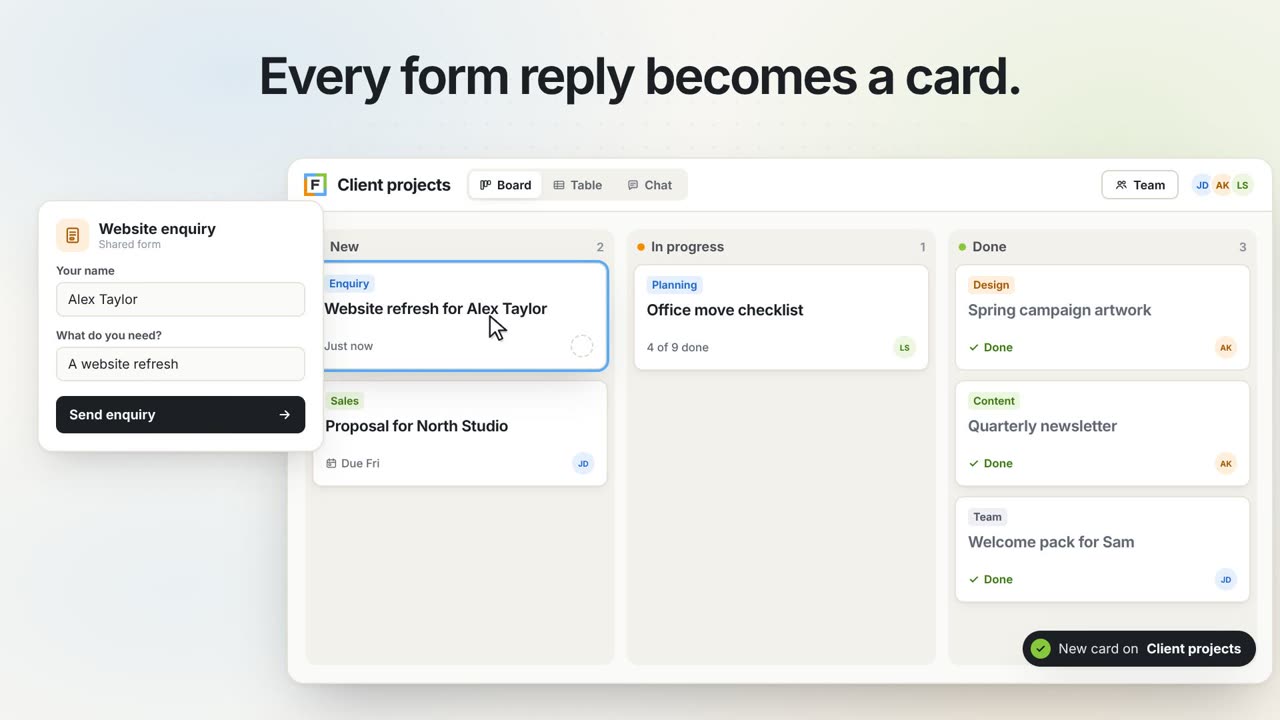
Let people tell you what they need. Each response lands on a board as a card, ready for an owner, a date and a next step.
- 1Ask the right questions
Build a form around the information you need.
- 2Keep the response in view
Every submission becomes a card on your board.
- 3Take the next step together
Add an owner, a date and a clear next action.
Formatic in
under a minute.
Watch a form reply land on a board as a card, get an owner and a due date, and reach the whole team.
Already getting started? Find a guide →Keep your Google tools.
Add a clearer workflow.
Bring tasks, form responses and spreadsheet information into a workspace built for following through.
Explore the integrations →Is Formatic for individuals or teams?
Both. Use it for your own tasks and projects, or share boards to organise work with other people. Available allowances depend on your plan.
What is the difference between a board and a form?
A board is where you organise the work. A connected form is a way for someone to submit information to it, such as an enquiry or request.
Can I use it with Google tools?
Formatic includes connections for Google Tasks, Forms and Sheets. The help guides explain how to set up the relevant integration.
Do I have to start from scratch?
No. Browse the template library for starting points across projects, sales, content, events and more. You can also build your own board.
Bring your next project
into one clear place.
Set up a board in minutes, invite your team and add a form when you need one.